AI in Telegram: The Complete Guide to Chat, Images, Video, Voice and Music (2026)
You don't need five apps, five accounts and five subscriptions to use AI. This guide shows everything AI can do inside Telegram, from answering questions to creating images, videos, voice messages and songs, how to start in two minutes, what it costs, and how to stay safe from fake bots.
The short answer: you can use AI without leaving Telegram. A Telegram bot is a small app that lives inside a chat: you write to it like a friend, and it answers, draws, films, speaks or sings for you. With one bot such as heymesbot you get AI chat, image creation, photo editing, video, voice messages and music in a single conversation, in your own language, with no subscription.
In this guide
Why Telegram is the easiest place to use AI
Six things you can do, with example requests
The usual way vs. the Telegram way
How to start in four steps, and what it costs
How to spot fake bots and keep your data safe
Why use AI inside Telegram?
Most people who want to try AI end up juggling: one website for chat, another app for images, a third tool for video, each with its own account, its own subscription and often an English-only interface. Telegram removes almost all of that friction:
It is already open. Telegram has more than a billion active users, according to its founder Pavel Durov. No new app to install, no new password to remember.
Your results arrive as real Telegram media. Images, videos, voice messages and audio files land in the chat, ready to forward to a friend, post in a channel or save to your phone.
It works everywhere you use Telegram: phone, tablet, desktop and web, with your history in sync.
It speaks your language. A good bot has its whole interface translated, not only the AI's answers.
If you are new to AI itself, our guide What Is Artificial Intelligence and How Does It Work? explains the basics in plain English.
What Telegram's own AI does, and what it doesn't
Telegram has started adding AI of its own. In January 2026 it introduced AI summaries for long channel posts and Instant View pages, running on open-source models in Cocoon, a privacy-focused AI network built on TON. That is useful for catching up on news, but it is a reading aid: it does not answer your questions, write for you, create images or make videos.
For everything else, Telegram relies on bots: independent apps that anyone can build on Telegram's platform. That is why choosing the right bot matters, and why the rest of this guide focuses on what a full AI bot can do.
Six things you can do with AI in Telegram
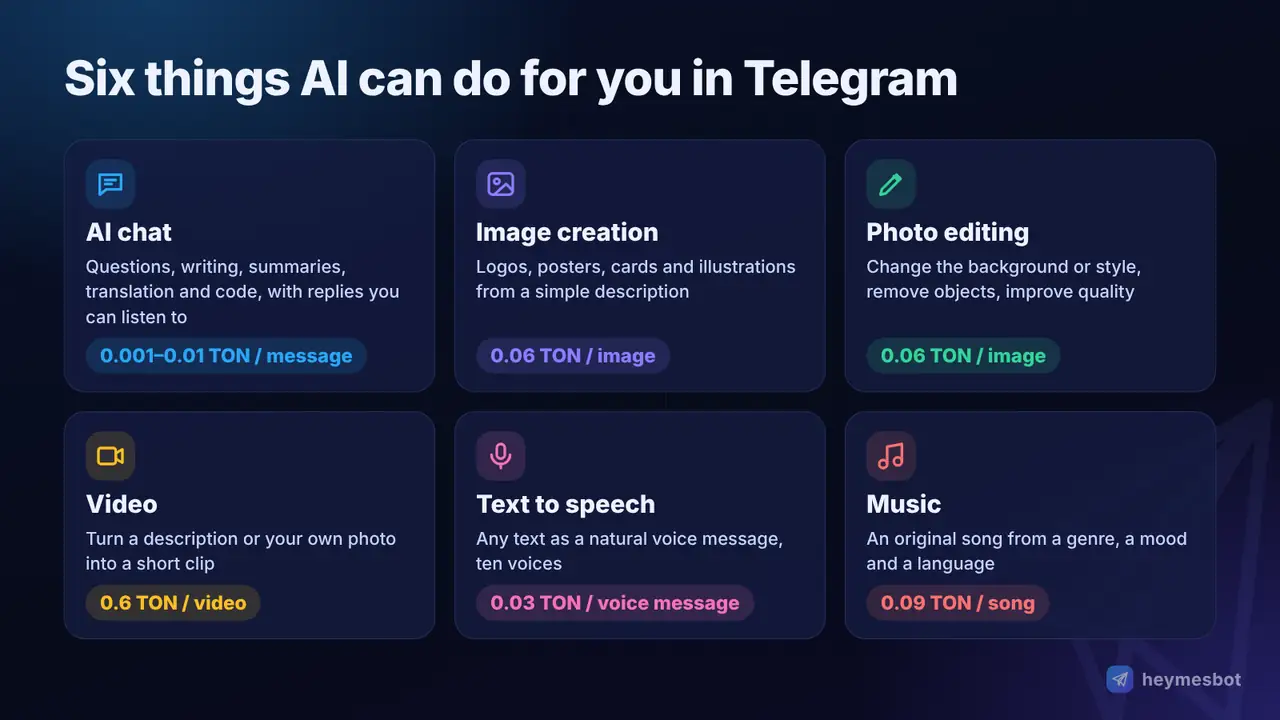
1. Ask anything and get help with writing
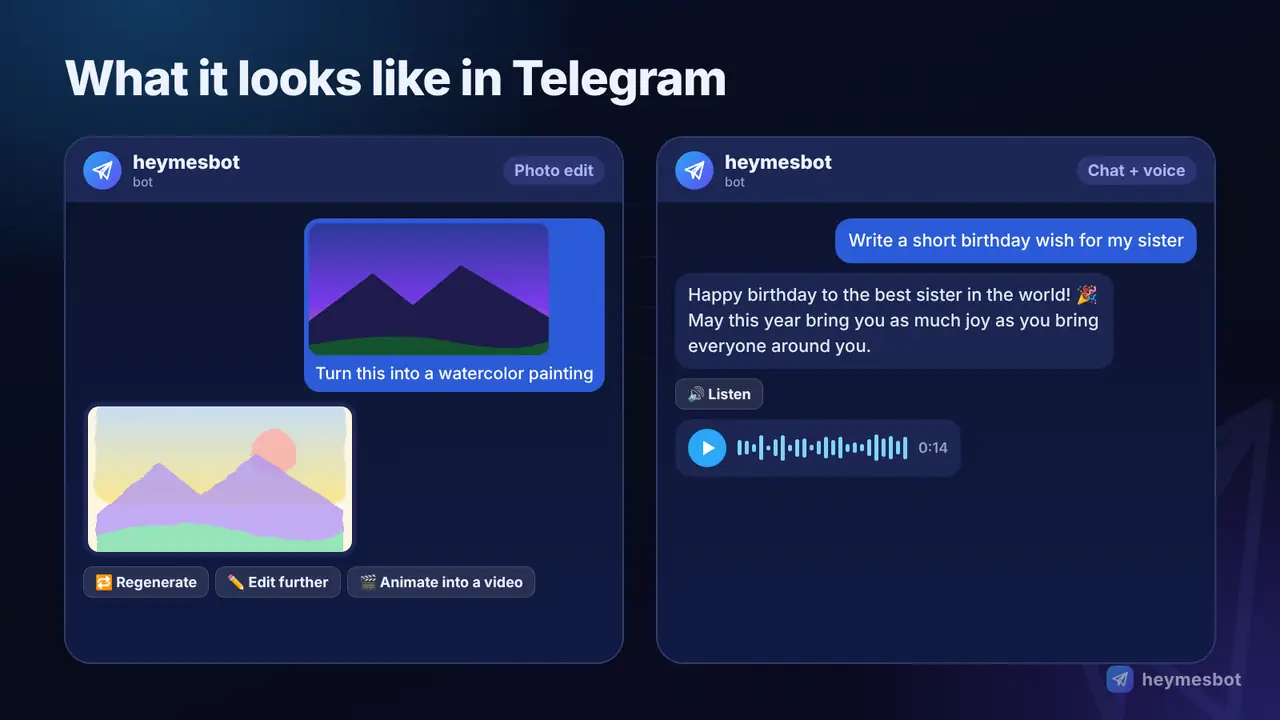
Ask questions, get explanations, draft emails and posts, summarise long texts, translate, plan a trip or fix a piece of code. A smart AI chat remembers the conversation, so you can say "shorter" or "now make it formal" instead of starting over. In heymesbot every answer also has a 🔊 Listen button that reads it aloud. More about AI chat.
Explain how compound interest works with a simple example, then give me three tips for saving money as a student.
2. Create images from a description
Describe a picture and the AI draws it: a logo idea, a poster, a birthday card, a product photo, an illustration for your channel. The more specific you are about the subject, style, light and framing, the better the result. More about image creation.
A cosy reading corner by a rainy window at night, warm lamp light, watercolor style, 16:9.
3. Edit your own photos
Send a photo with a caption saying what to change: replace the background, change the style, remove an object, improve the quality. Without a caption, heymesbot offers ready options such as Describe what to change, Enhance / Upscale and Change style. Send several photos together and it can combine them.
Replace the background with a beach at sunset; keep my face and clothes exactly as they are.
4. Turn text or photos into video
Describe a short scene, or send a photo and say how it should move, and the AI makes a short video clip. It is ideal for bringing an old photo to life, animating a product shot or making an eye-catching clip for a story or channel. More about video creation.
Slow camera push-in, the leaves move gently in the wind and the sunlight flickers through the trees.
5. Turn text into natural speech
Paste any text and get it back as a Telegram voice message in a natural-sounding voice. heymesbot has ten voices to choose from and remembers your favourite. Useful for voice-overs, listening to long texts, language practice or sending a message you'd rather not record yourself. More about text to speech.
6. Make an original song
Describe the genre, mood, tempo, instruments and the language of the vocals, and the AI composes a short original track. Describe a style instead of naming a real singer: imitating a real artist's voice is refused by the music model. More about music creation.
Upbeat summer pop, bright guitars and handclaps, female vocals in English about a road trip with friends.
Want better results from every request? Read our complete guide to writing AI prompts.
The usual way vs. the Telegram way
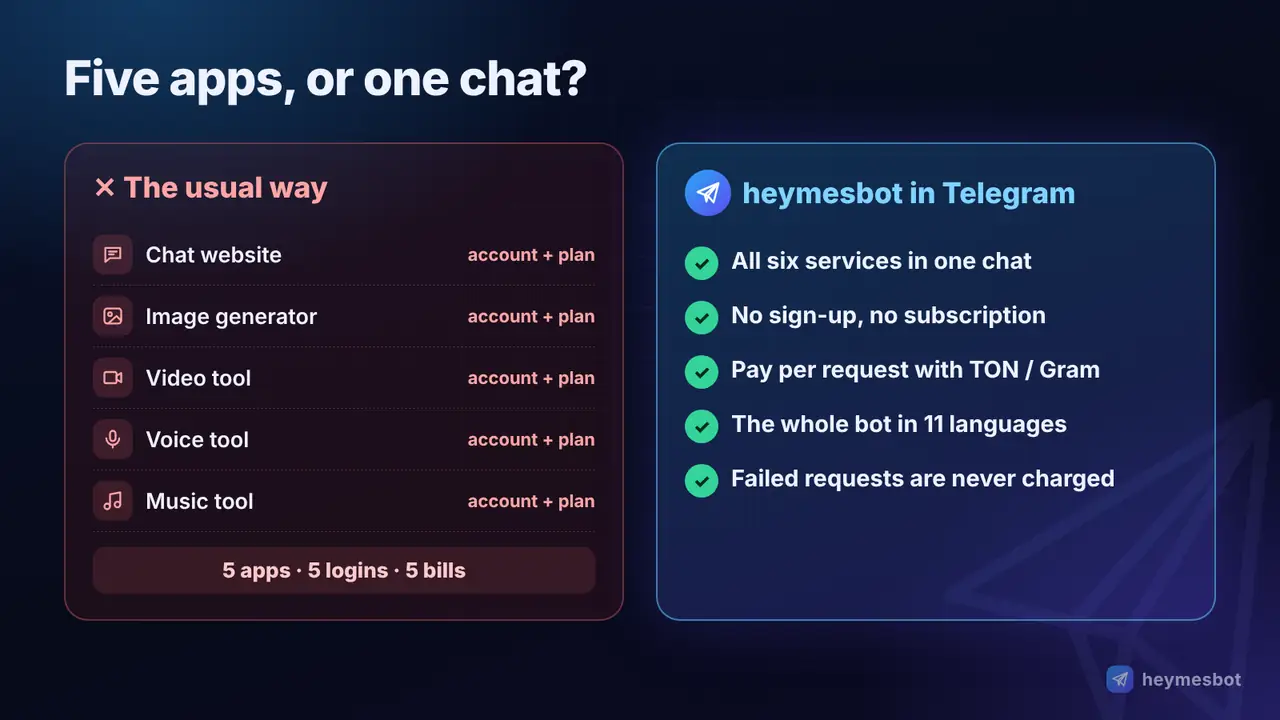
| Separate AI apps and websites | heymesbot in Telegram | |
|---|---|---|
| Apps and accounts | One for chat, one for images, one for video, one for voice, one for music | One Telegram chat, no sign-up |
| Cost model | Monthly subscriptions, about $20 each for the popular chat plans | No subscription: pay only for what you use |
| Payment | Usually a bank card the service accepts | TON / Gram from any TON wallet |
| Language | Often English-first | Whole bot in 11 languages |
| Failed requests | Count against your plan | Never charged |
| Sharing results | Download, then upload elsewhere | Already in Telegram, forward in one tap |
A subscription makes sense if you use one tool heavily every day. If you want a bit of everything, a few images this week, a video for a birthday, a song for fun, paying per request is simpler and usually cheaper.
How to start with heymesbot in four steps
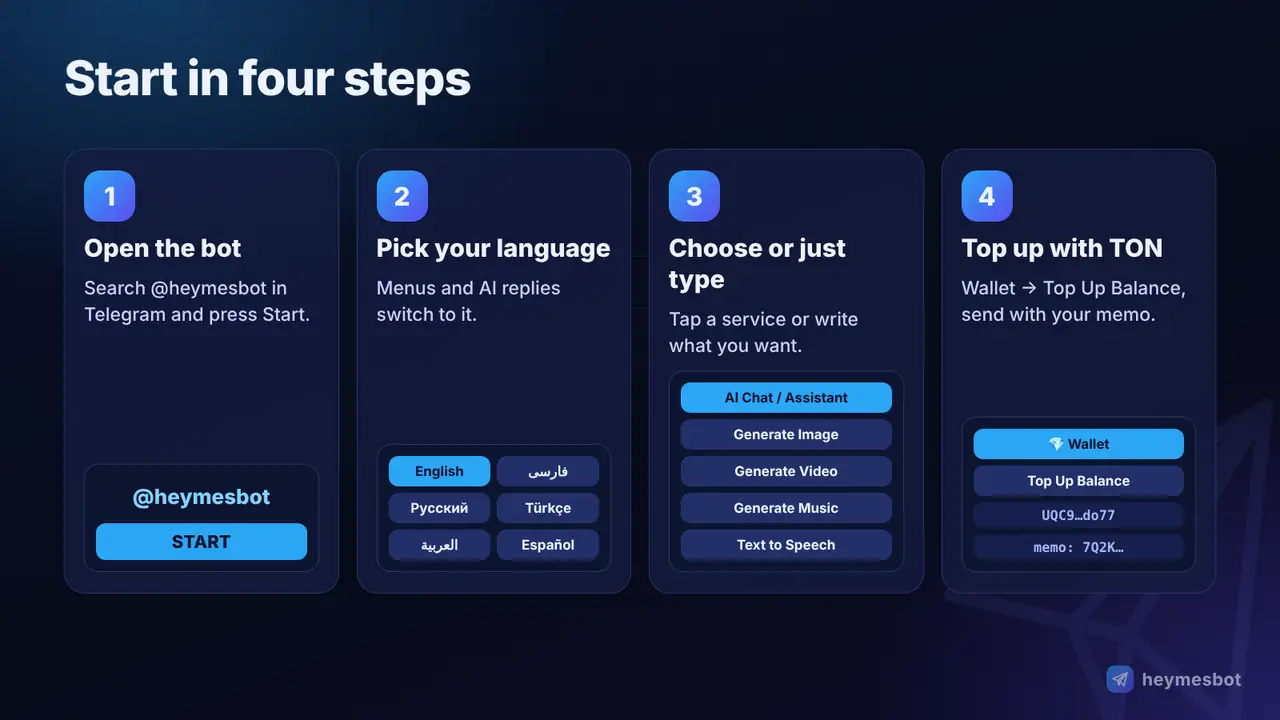
Open the bot. Tap t.me/heymesbot or search for @heymesbot in Telegram and press Start.
Choose your language. The whole bot switches to it, from the menus to the AI's replies.
Pick a service or just type. Use the menu buttons (AI chat, Generate Image, Generate Video, Generate Music, Text to Speech) or simply write what you want; the bot understands whether you want a picture, a video or an answer, and asks if something is missing.
Top up when you're ready. New users get a small free balance to try AI chat. To top up, open Wallet → Top Up Balance and send TON (Gram) with your personal memo. The balance is credited automatically. Step-by-step instructions are in how to buy Gram and top up heymesbot.
Here is what it looks like in practice:
What it costs: transparent pay-as-you-go
Every price is fixed in TON and shown before you use anything. You are charged only when a request succeeds and reaches you.
| Service | Price |
|---|---|
| AI chat | 0.001 to 0.01 TON per message, depending on the request |
| Image creation or photo edit | 0.06 TON per image |
| Video (from text or a photo) | 0.6 TON per video |
| Text to speech | 0.03 TON per voice message |
| Music | 0.09 TON per song |
These prices have been fixed since 17 October 2026, and heymesbot has committed not to change them. Every top-up and every charge is listed in your wallet history, so you can always see exactly where your balance went. The full price list is on the pricing page.
How to choose a safe AI bot and avoid fakes
Popular names attract copycats. Security firms such as Bitdefender warn about Telegram bots and accounts that impersonate well-known brands to collect passwords, codes or payments. A few habits keep you safe with any bot:
Check the exact username. The real bot is @heymesbot. Open it from the official website heymesbot.com rather than from a forwarded link.
Never share passwords, login codes or card numbers with any bot or "support" account. A real AI bot never needs them.
Pay only through the bot's own screen. In heymesbot, the address and your memo come from Wallet → Top Up Balance, never from a private message.
Look for transparent prices. If a bot won't tell you what a request costs before you use it, be careful.
Privacy: what happens to your photos and messages?
To create a result, your request is sent to the AI model that produces it. heymesbot keeps your recent chat messages so the AI can remember the context of the conversation. The photos you send and the images it creates are not stored on heymesbot's own servers: the bot keeps only Telegram's reference to the file, and the file itself stays in Telegram.
As with any online service, don't send ID documents, bank details or other people's private photos.
Good to know before you start
AI can be wrong. Check important facts, numbers and quotes, especially for health, legal or financial questions.
Some requests are refused by the AI models themselves, for example explicit content or imitating a real singer's voice. A refused request costs nothing.
Videos are short clips and can take a few minutes to make; the bot tells you it's working and sends the clip as soon as it's ready.
One voice message holds up to 1,000 characters. Split longer texts into parts.
Start now
You already have Telegram. Everything else takes about two minutes: open the bot, choose your language and send your first message. Try a question, an image or a voice message with your free starting balance, and top up only if you like it.
Prefer to read more first? See all the features and the price list, or keep our AI glossary handy for the terms you'll meet along the way.
Comments
No comments yet. Be the first to share a thought.
Leave a comment
Comments are reviewed before they appear. Please keep it relevant and kind.